mParivahan Challan: Status Check & Online Payment Guide
That SMS lands on your phone and your stomach drops a little. I get it — even when you know you were driving carefully, a challan notice from an automated camera makes you second-guess everything. Was it actually my vehicle? Did I genuinely jump that light? How much is this going to cost me?
Here is the thing though. Getting the notice is not the problem. What gets people into real trouble is ignoring it, or worse, trying to pay it and ending up on a fake website that takes your money but never clears the fine. I have seen both happen more times than I can count.
In this guide I am going to walk you through exactly how to check if a challan against your vehicle is real, how to pay it safely through the official government portal, and what to do if you genuinely believe the fine was issued by mistake. Because yes — that option exists, and most people have no idea about it.
Check Your mParivahan Challan Status
To check an mParivahan challan, visit the official e-Challan Parivahan portal (
echallan.parivahan.gov.in) or use the NextGen mParivahan App. Select ‘Check Challan Status’ and enter your vehicle number, challan number, or driving license. To view full details, you must provide the last 5 digits of your chassis or engine number. If the status shows ‘Sent to Court,’ payments must be made via the Virtual Court portal (vcourts.gov.in).
Navigating the Digital Transport Ecosystem
How to Verify Authenticity
Before clicking any links in an SMS, verify the sender. Official messages will never ask you to download a third-party file or pay through a private UPI ID. Always use the following verified methods:
Method A: The NextGen mParivahan Mobile App
- Login: Use your Aadhaar-linked mobile number for a secure MPIN login.
- Dashboard: Click on the ‘Transport Services’ icon.
- Challan Search: You can search by Vehicle Number.
- Security Check: For privacy, the system requires the last 5 digits of your vehicle’s chassis number. This prevents unauthorized people from viewing your fine history.
Method B: The e-Challan Web Portal (Most Reliable)
If the mobile app is undergoing maintenance, the web portal is the most stable environment for high-value transactions.
- Navigate to the e-Challan Parivahan website.
- Enter your 10-digit Vehicle Number.
- Solve the Captcha and click ‘Get Detail’.
Step-by-Step: Paying Your Fine via official Gateways
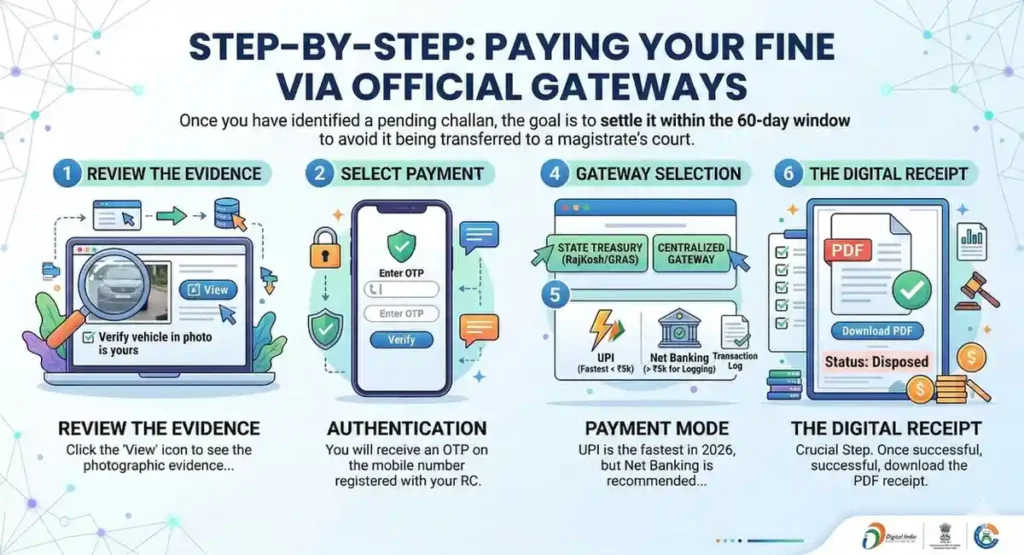
Once you have identified a pending challan, the goal is to settle it within the 60-day window to avoid it being transferred to a magistrate’s court.
- Review the Evidence: Click the ‘View’ icon to see the photographic evidence of the violation. Ensure the vehicle in the photo is actually yours.
- Select Payment: Click the ‘Pay Now’ button next to the specific challan.
- Authentication: You will receive an OTP on the mobile number registered with your RC.
- Gateway Selection: Choose between the state-specific digital treasury (like RajKosh or GRAS) or the centralized payment gateway.
- Payment Mode: UPI is the fastest in 2026, but Net Banking is recommended for amounts exceeding ₹5,000 to ensure better transaction logging.
- The Digital Receipt: Crucial Step. Once the payment is successful, download the PDF receipt. The “Status” should change to ‘Disposed’.
The “Pending Payment” Crisis: How to Resolve Sync Errors
A common frustration for users is when money is debited from their bank account, but the mParivahan status remains “Pending.”
Do not pay twice. The system architecture, bank-to-server synchronization, can take up to 48 hours. If you face this:
- Go to the e-Challan portal.
- Look for the ‘Check Failed Transaction’ or ‘Re-Verify’ button.
- Click it to trigger a manual “handshake” between the NIC server and the bank.
- If the status doesn’t update after 72 hours, file a grievance with your bank transaction ID.
Understanding “Sent to Court” vs. “mParivahan Online”
If you ignore a challan for more than 60-90 days, or if the offense is severe (like drunk driving), the status will change to “Sent to Court.”
At this stage, the mParivahan app cannot accept payment.
- The Virtual Court Solution: Visit
vcourts.gov.in. - Select your State and Department.
- Search by your Mobile Number or CNR (Case Number Record).
- Admit Guilt: You can pay the fine online to close the case.
- Contest: If you feel the fine is unjust, you can opt to have the case heard by a physical court.
How to Dispute a Wrongfully Issued Challan
The Official Grievance Process:
- Do Not Pay: Paying is an admission of guilt.
- Contact the Traffic HQ: Every major city (Delhi, Bangalore, and Hyderabad) has a dedicated e-mail for challan disputes.
- The Portal Method: On the e-Challan website, use the ‘Complaint’ link.
- Evidence: Please attach a clear photo of your vehicle’s number plate and a screenshot of the photo you believe is incorrect.
- Follow-up: Most disputes are resolved within 15 working days. If valid, the challan will be “cancelled” from the portal.
Penalty Matrix: Common Offenses & Costs
| Violation | Penalty (Approx.) | Impact on Record |
| Overspeeding (LMV) | ₹1,000 – ₹2,000 | Logged in Digital Driver History |
| Driving Without Valid Insurance | ₹2,000 | RC Services Blocked |
| Red Light Jumping | ₹1,000 – ₹5,000 | Risk of DL Suspension |
| Drunk Driving | ₹10,000 + Court | Mandatory Jail/Court Visit |
| Using Mobile While Driving | ₹5,000 | 3-Month DL Suspension |
Why Keeping a Clean Record Matters
Under the NextGen Vahan rules, a “Blacklisted” vehicle (one with multiple unpaid challans) faces several hurdles:
- No Insurance Renewal: Insurance providers are now linked to the mParivahan database. They may refuse to renew or hike your premium if you have unpaid fines.
- Fitness Certificate (FC) Block: Commercial vehicles cannot get an FC if there are pending challans.
- Resale Value: A buyer can check your vehicle’s history instantly. A history of violations significantly lowers the resale price.
FAQs
How many days does it take for a challan to appear in mParivahan?
Usually, it appears within 24 to 48 hours. However, for manual challans issued by officers, it might take up to 7 days to be uploaded to the central server.
Can I pay a Delhi Traffic Police challan on mParivahan?
Yes. The mParivahan and e-Challan portals are centralized. Whether the fine was issued in Delhi, UP, or Maharashtra, it can be paid via the NIC’s national portal.
What happens if I don’t pay my e-Challan?
If unpaid for 60 days, the case is moved to a virtual court. If ignored there, a summons may be issued to your registered address, and your vehicle may be “blacklisted” in the Vahan database.
Is the digital receipt from mParivahan enough for the traffic police?
Absolutely. Under the IT Act, a digital receipt or a “Paid” status on the mParivahan app is valid legal proof of settlement. You do not need a physical stamp.
Can I check someone else’s challan status?
You can see if a challan exists using just the vehicle number, but to see specific details or pay, you need the Engine/Chassis number or the OTP from the owner’s registered mobile.